
Integration Method - Android SDK
In this document, we provide a detailed guide for integrating OSL Pay services through Android SDK.
Product introduction
The OSL Pay SDK allows partners to integrate OSL Pay crypto purchase services without additional development. It is built upon our core OpenAPI system.
Below is a comparison between integration via the OSL Pay SDK and the OpenAPI:
| Feature | OSL Pay SDK integration | OpenAPI integration |
|---|---|---|
| Integration complexity | Low; plug-and-play with the SDK. | Higher; requires custom client and backend logic. |
| Time to market | Fast (ideal for POCs or rapid pilots). | Slower (requires full dev/test cycles). |
| User experience | Pre-built UI flow. | Fully customizable; total UX control. |
| Server responsibilities | Handle webhooks and verify orders. | Initiate orders, query status, and manage the end-to-end flow. |
| Best for | Startups, rapid integrations, or resource-constrained projects. | Established platforms with full dev teams requiring bespoke business logic. |
Product demo
Login
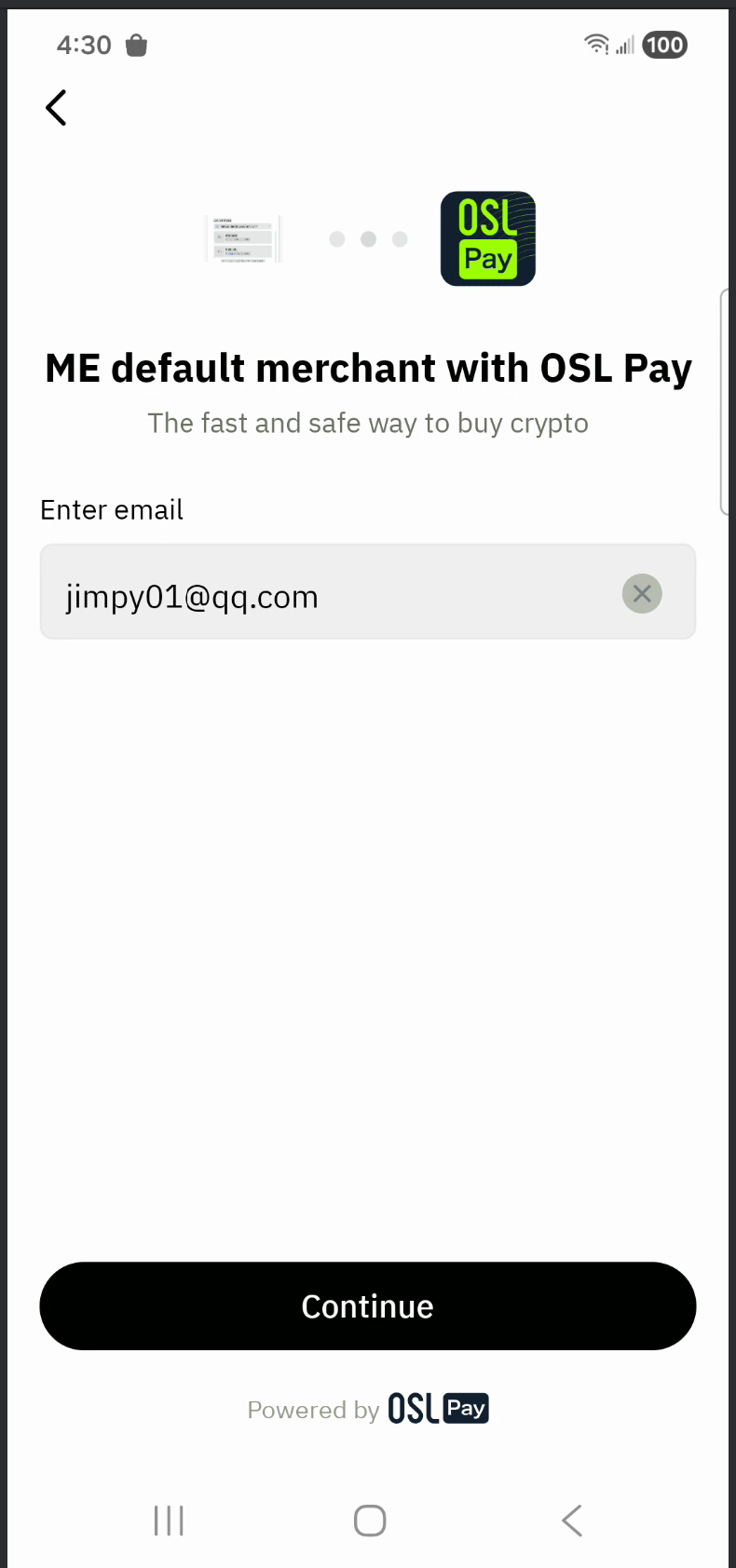
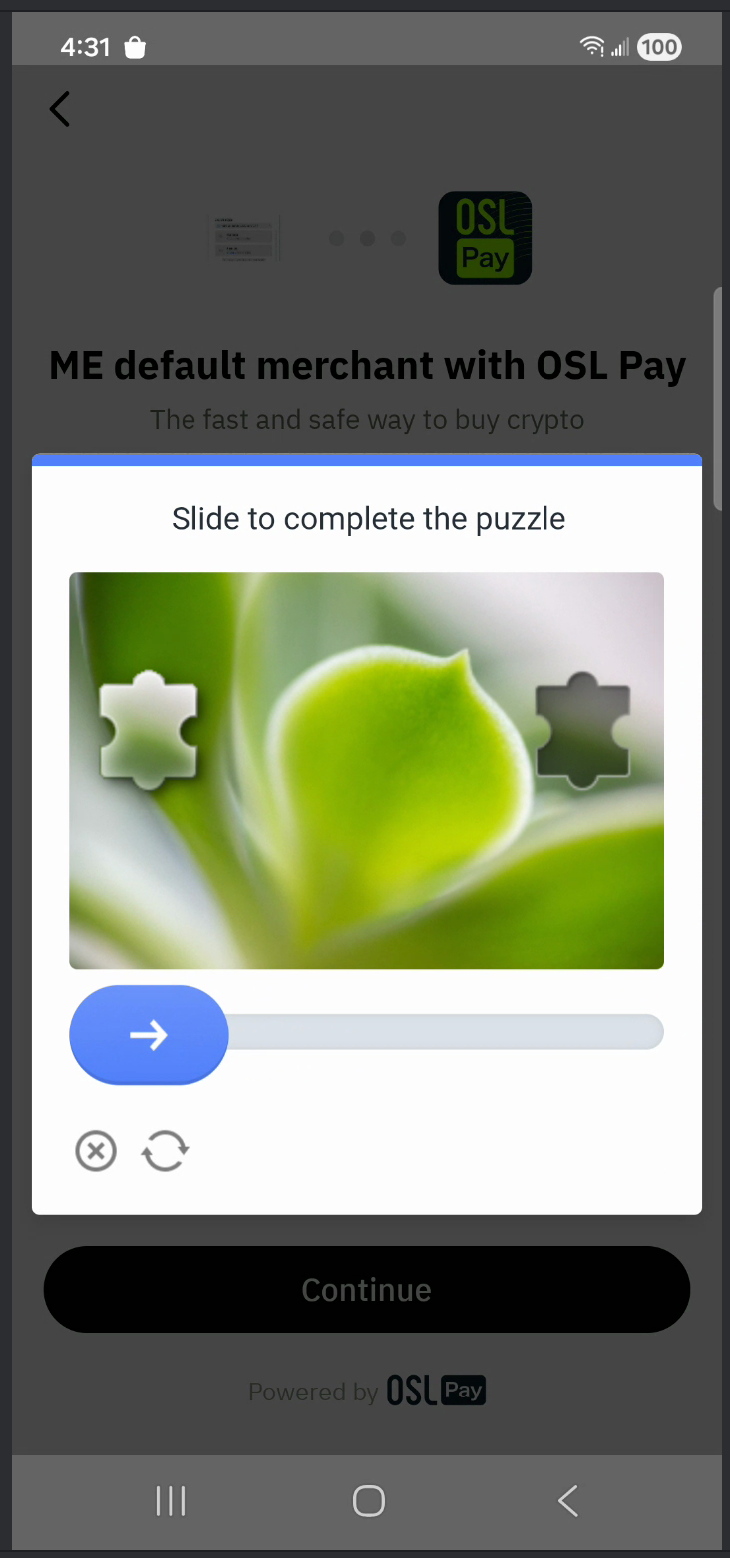
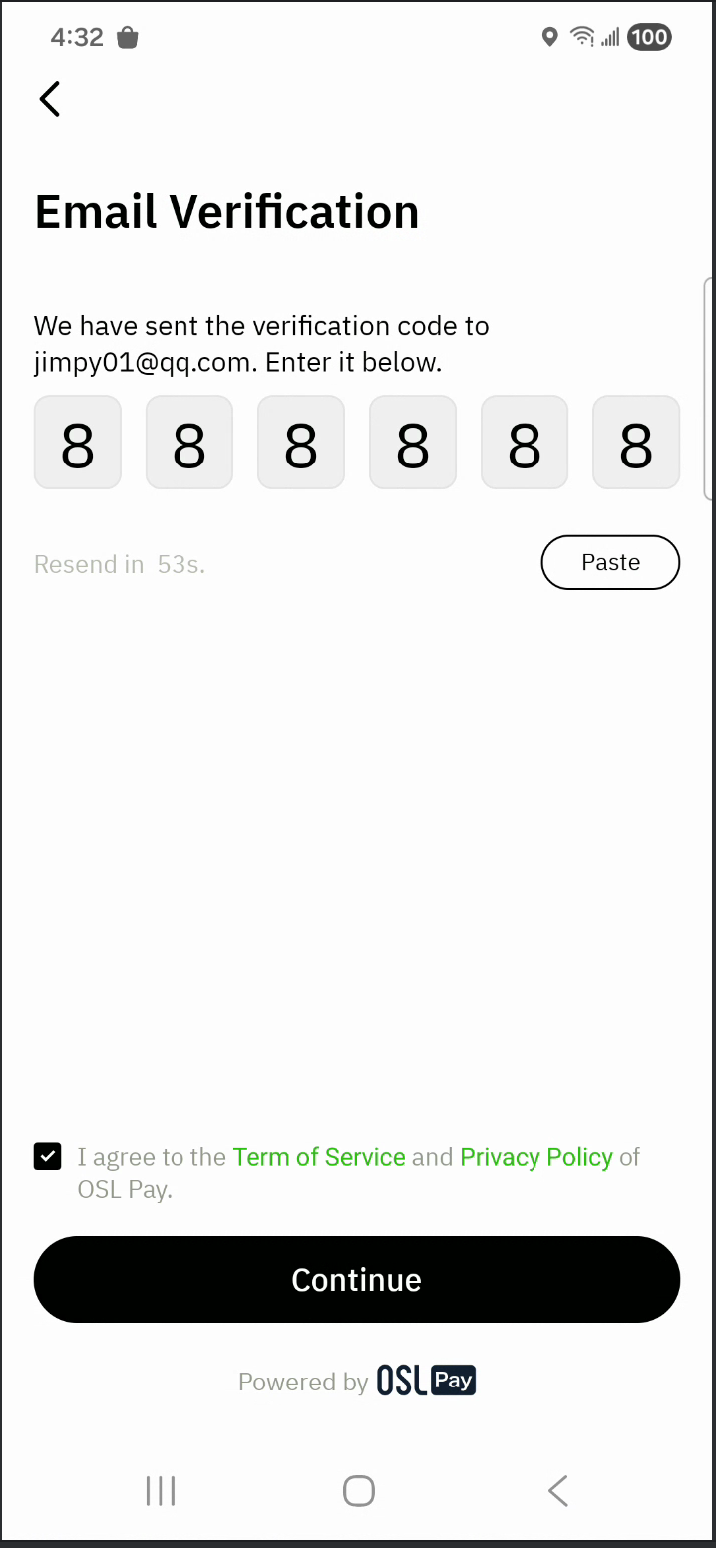
Buy crypto
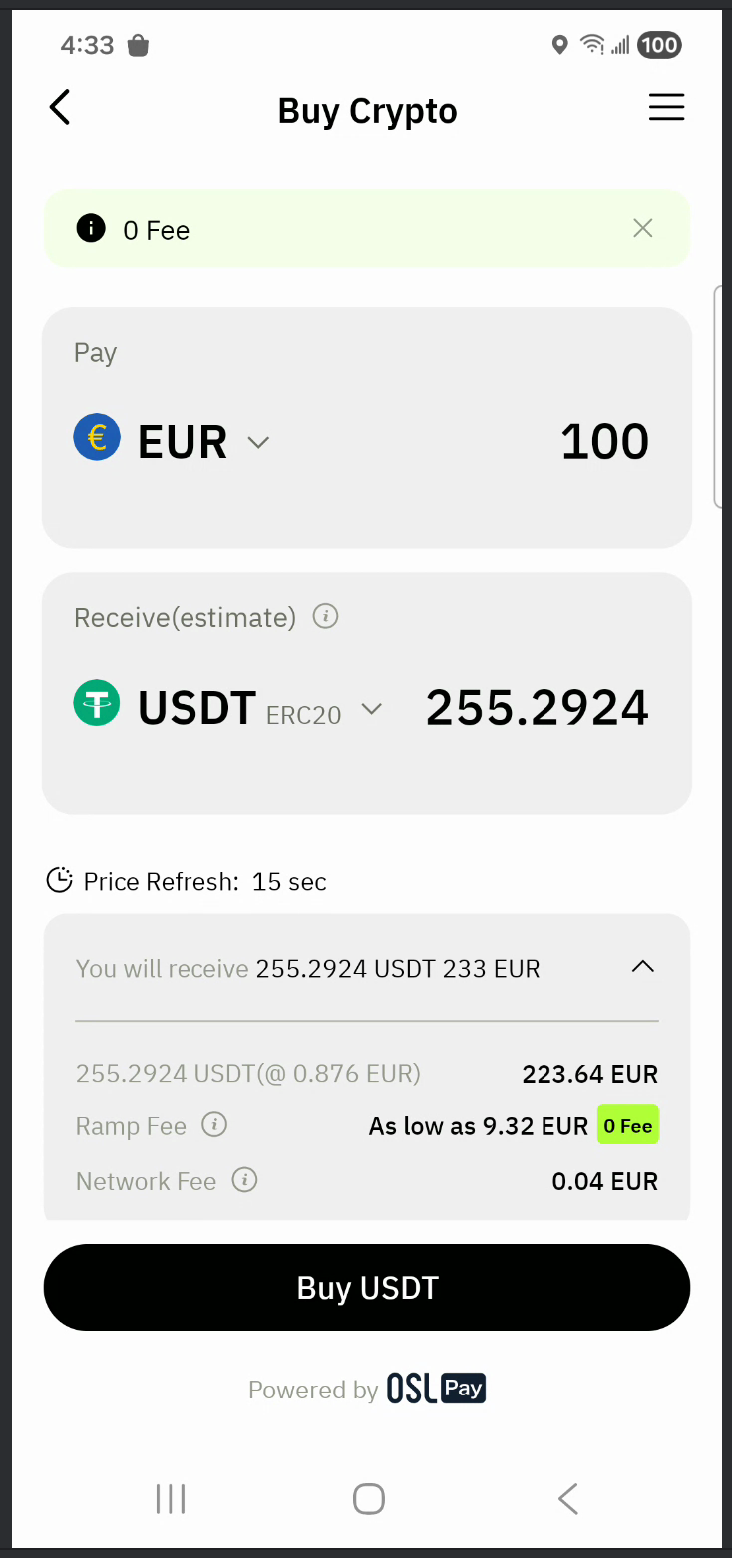
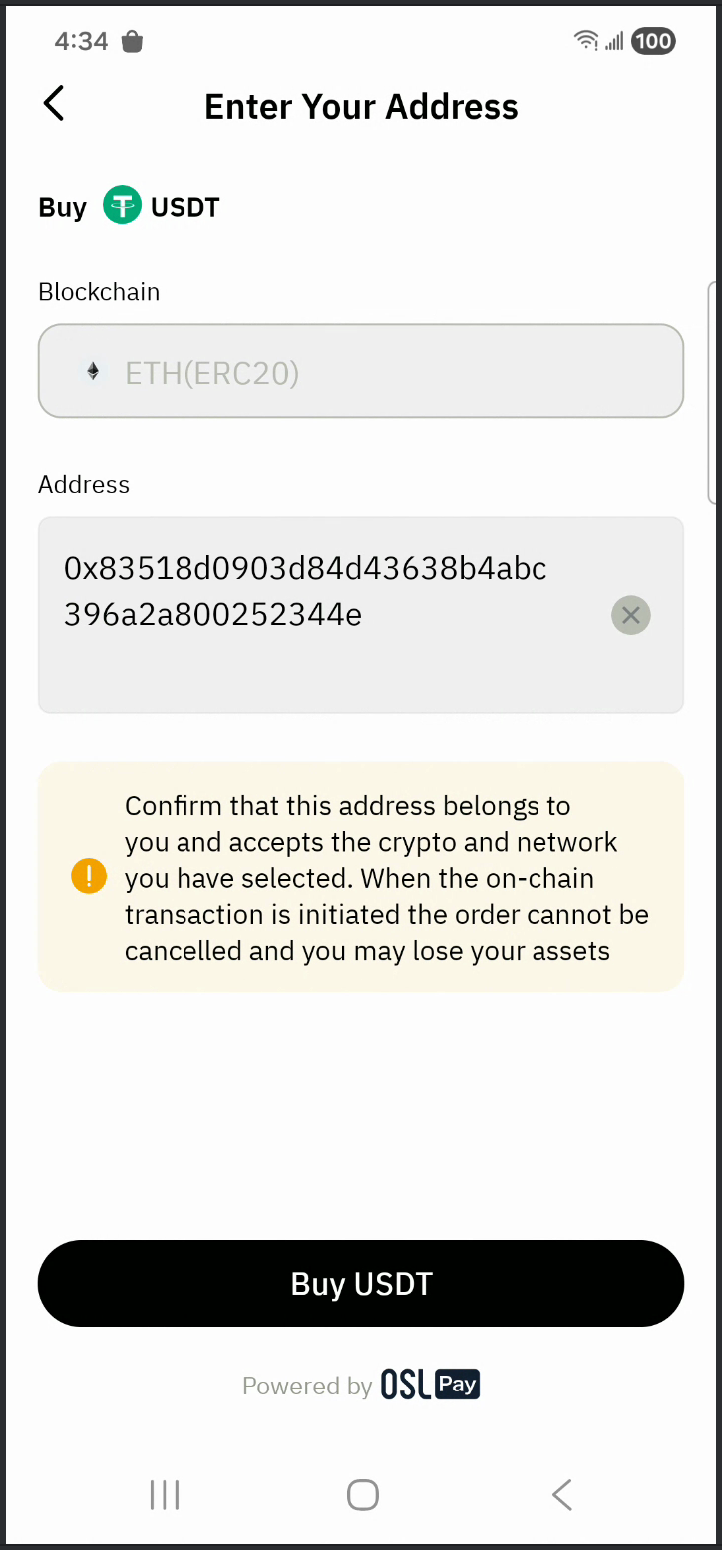
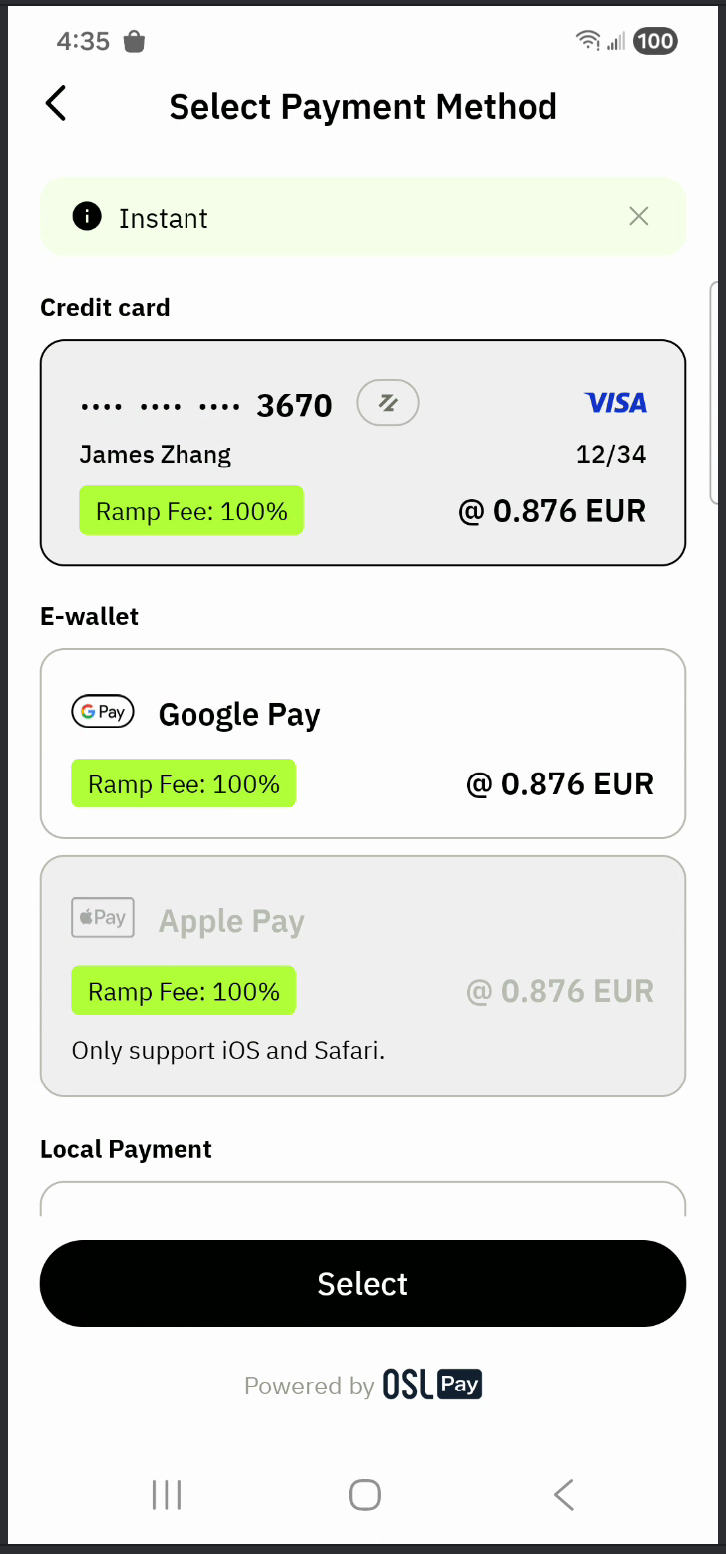
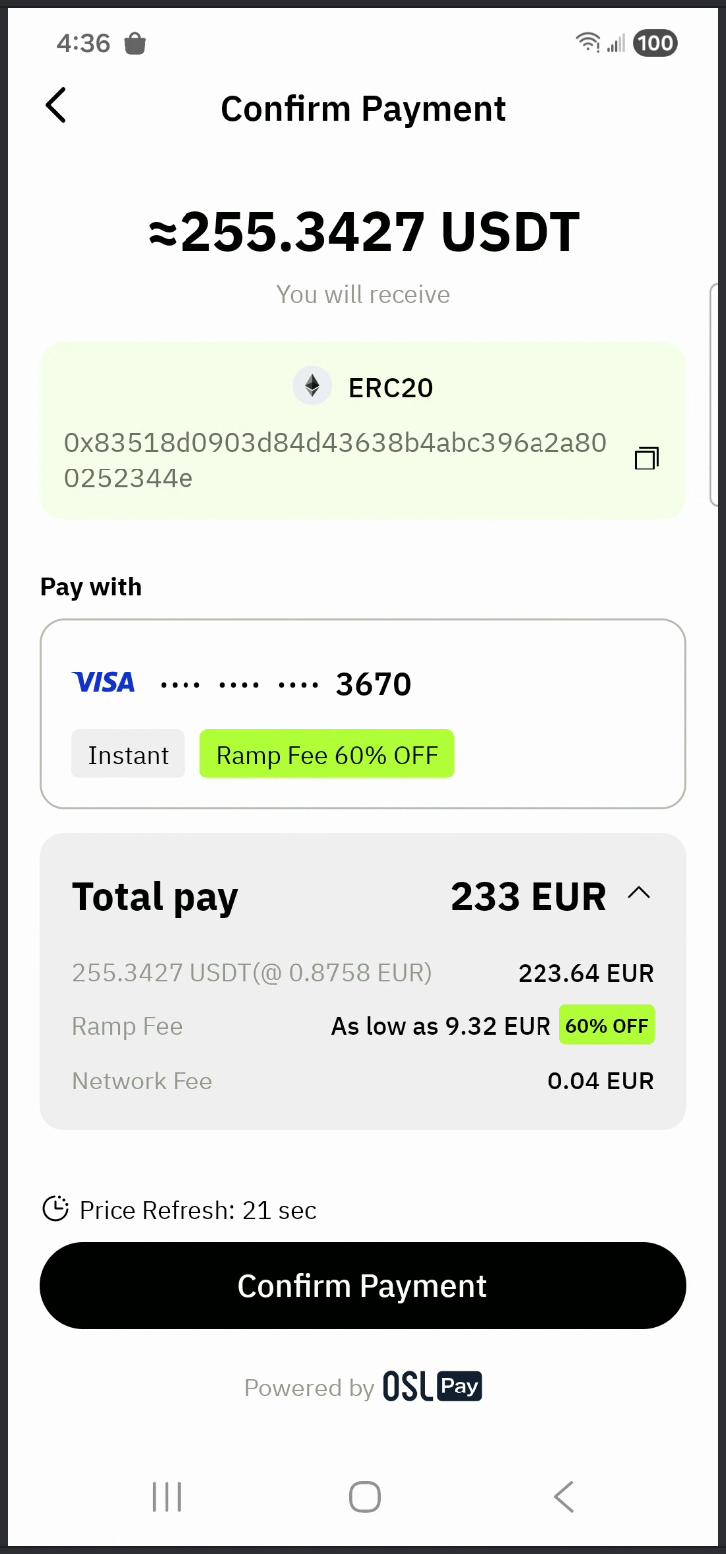
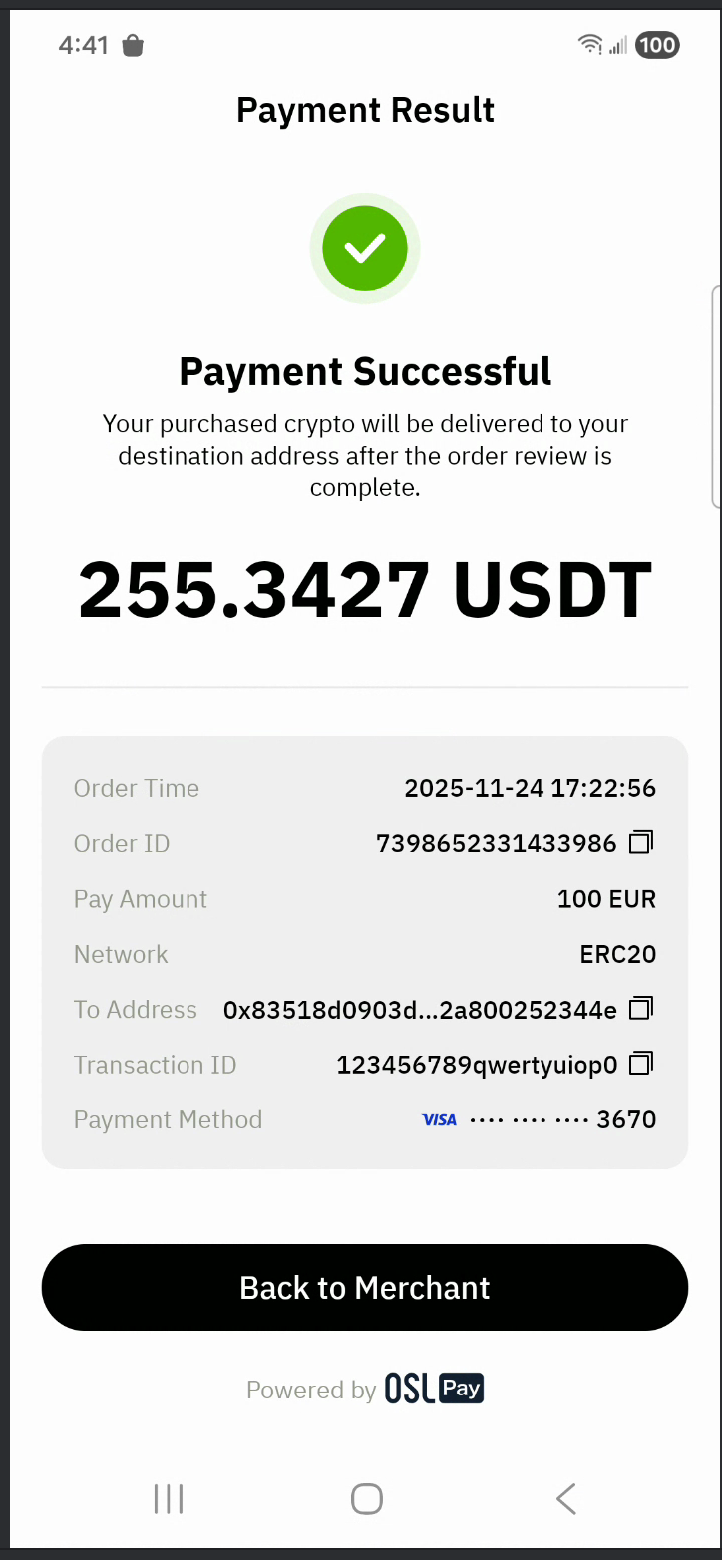
User center
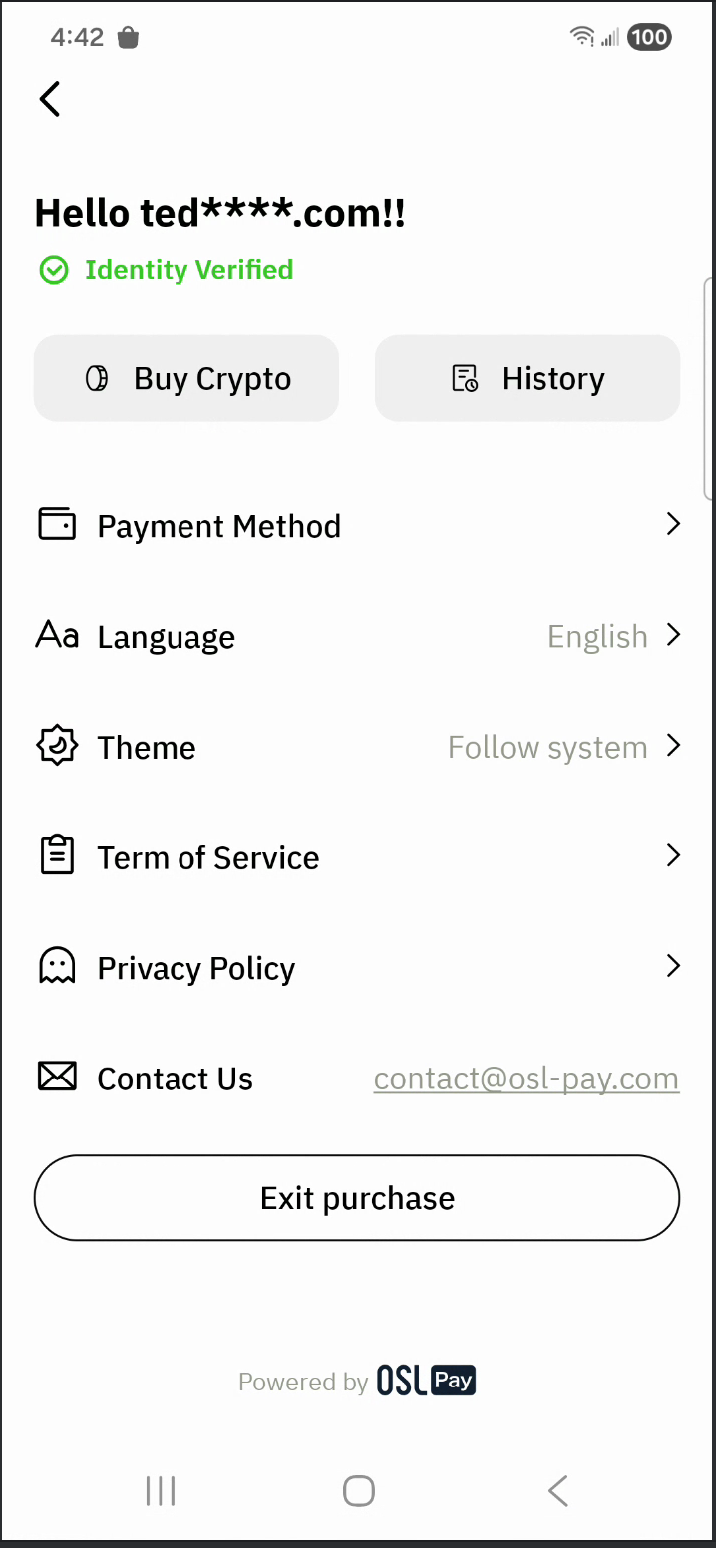
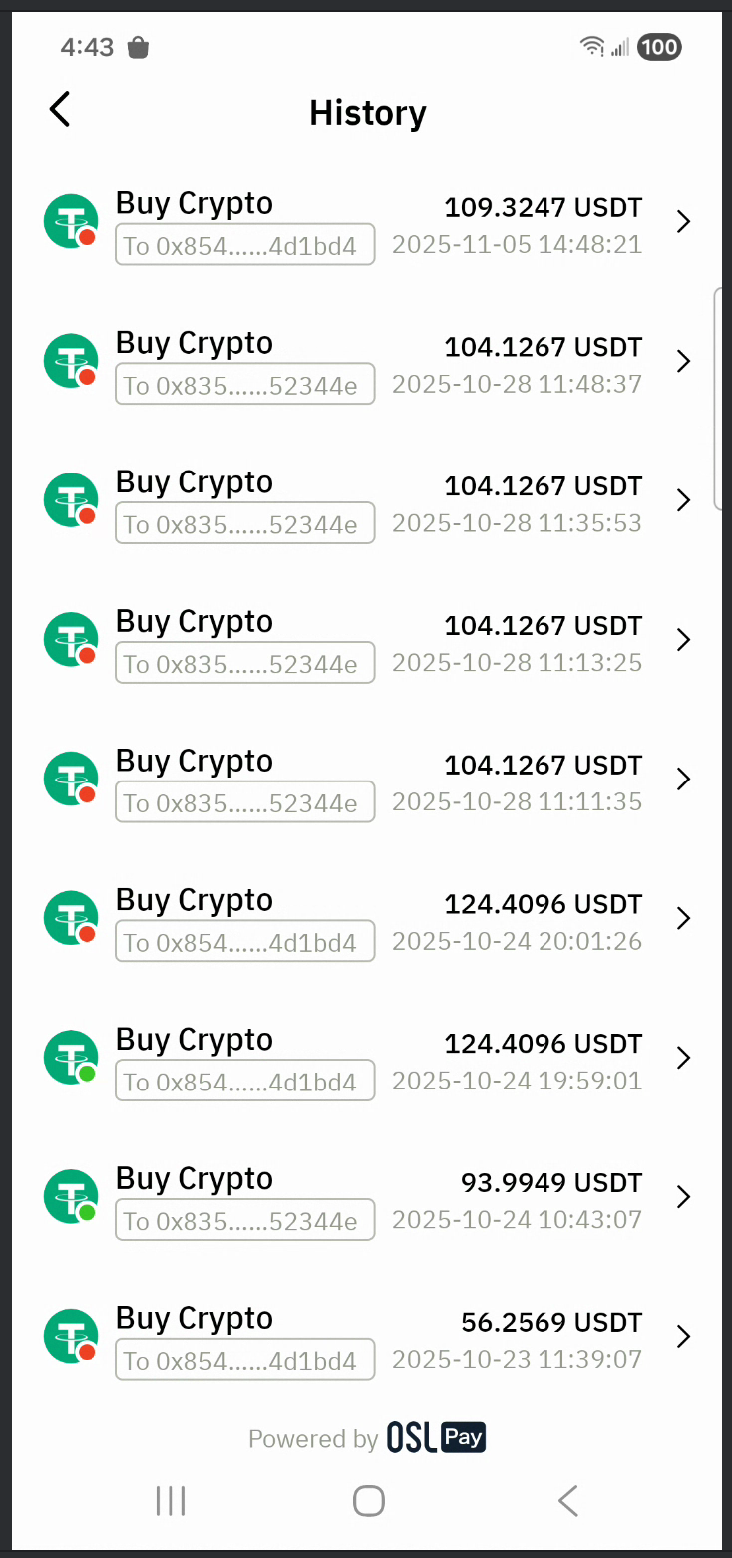
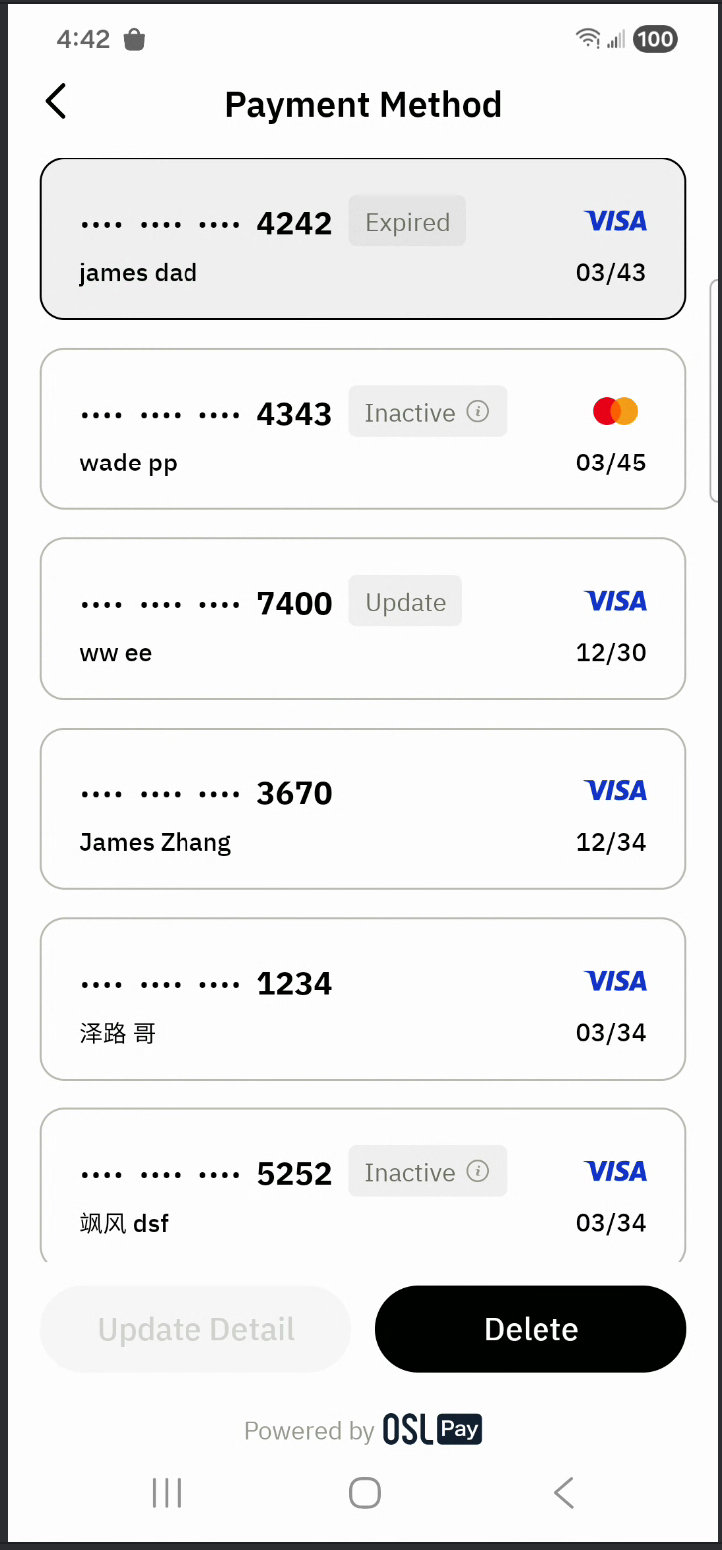
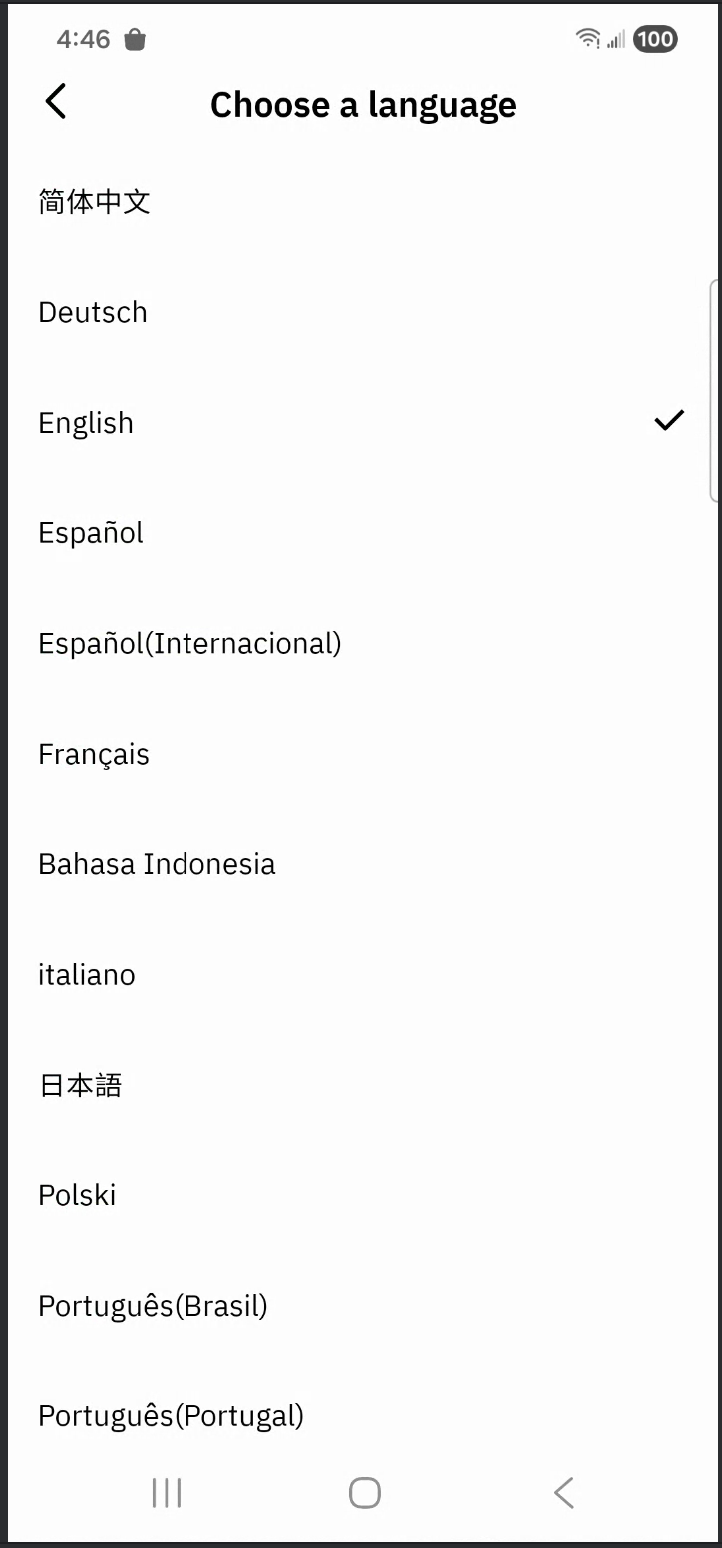
OSL Pay SDK integration steps
1.SDK build environment
The OSL Pay SDK is compiled in the following environment:
- id = "com.android.library", version.ref = "8.3.2"
- id = "org.jetbrains.kotlin.android", version.ref = "2.0.0"
- minSdk 24
- targetSdk 36
- compileSdk 36
2.Add OSL Pay SDK dependencies
Add the following three .aar files to your libs folder:
- OslPaySdk-release.aar: The core OSL Pay SDK binary
- widget-xxx.aar: UI component library required by the SDK
- geetest_captcha_android-xxx.aar: Geetest SDK for login verification
Configure your build.gradle as follows:
implementation fileTree(dir: 'libs', include: ['.jar', '.aar'])
3.Add required dependencies
  	//2.Official dependencies required by the SDK
    implementation "androidx.core:core-ktx:1.13.1"
    implementation "androidx.appcompat:appcompat:1.7.0"
    implementation "com.google.android.material:material:1.10.0"
    implementation "androidx.constraintlayout:constraintlayout:2.1.4"
    implementation "androidx.activity:activity:1.8.1"
    implementation "androidx.activity:activity-ktx:1.8.1"
    implementation "androidx.fragment:fragment:1.7.1"
    implementation "androidx.fragment:fragment-ktx:1.7.1"
    implementation "androidx.lifecycle:lifecycle-viewmodel-ktx:2.8.7"
    implementation "androidx.lifecycle:lifecycle-livedata-ktx:2.8.7"
    implementation "androidx.lifecycle:lifecycle-runtime-ktx:2.8.7"
    implementation "androidx.recyclerview:recyclerview:1.3.2"
    implementation "androidx.annotation:annotation:1.9.1"
    implementation "androidx.annotation:annotation-experimental:1.5.1"
    implementation "androidx.webkit:webkit:1.14.0"

		//3.Third-party dependencies required by the SDK
    implementation("com.squareup.okhttp3:okhttp:4.12.0")
    implementation("com.squareup.okhttp3:logging-interceptor:4.12.0")
    implementation("com.squareup.retrofit2:retrofit:2.9.0")
    implementation("com.squareup.retrofit2:converter-gson:2.9.0")
    implementation 'com.google.code.gson:gson:2.13.2'
    implementation 'com.github.bumptech.glide:glide:4.16.0'
    kapt 'com.github.bumptech.glide:compiler:4.16.0'
    implementation 'com.caverock:androidsvg:1.4'
    implementation 'com.github.michaellee123:LiveEventBus:1.8.14'
    implementation "com.google.android.gms:play-services-wallet:19.4.0"
    implementation "com.github.fingerprintjs:fingerprint-android:2.2.0"
    implementation 'com.forter.mobile:fortersdk:3.0.10'
    implementation("com.fingerprint.android:pro:2.10.0")
    implementation("com.checkout:checkout-sdk-event-logger-android:1.0.1")

    //4.Dependencies required by other aar files (widget component library)
    implementation 'com.geyifeng.immersionbar:immersionbar:3.2.2'
    implementation 'com.geyifeng.immersionbar:immersionbar-ktx:3.2.2'
Configure repository sources:
dependencyResolutionManagement {
    repositoriesMode.set(RepositoriesMode.FAIL_ON_PROJECT_REPOS)
    repositories {
        google()
        mavenCentral()
        //OSL Pay SDK integration
        maven { url 'https://jitpack.io' }
        maven { // Forter repository
            url "https://mobile-sdks.forter.com/android"
            credentials {
                username "forter-android-sdk"
                password "HvYumAfjVQYQFyoGsmNAefGdR84Esqig"
            }
        }
        maven { url = uri("https://maven.fpregistry.io/releases") } // Checkout repository
    }
}
4.Configure build.gradle
Enable DataBinding:
plugins {
    id 'kotlin-kapt' // Required to enable DataBinding
}

    dataBinding {
        // widget-xxx.aar uses DataBinding, so it must be enabled
        enabled = true
    }
Enable ViewBinding:
    buildFeatures {
        viewBinding = true // 启用ViewBinding
        buildConfig = true // 生成BuildConfig
    }
Configure Java version:
    compileOptions {
        sourceCompatibility JavaVersion.VERSION_1_8
        targetCompatibility JavaVersion.VERSION_1_8
    }
    kotlinOptions {
        jvmTarget = '1.8'
    }
5.Required SDK permissions
OSL Pay SDK declares the following permissions:
    <uses-featureandroid:name="android.hardware.camera"android:required="false" />
    <uses-permission android:name="android.permission.ACCESS_NETWORK_STATE" />
    <uses-permission android:name="android.permission.INTERNET" />
    <!-- CAMERA and RECORD_AUDIO permissions are required for KYC verification -->
    <uses-permission android:name="android.permission.CAMERA" />
    <uses-permission android:name="android.permission.RECORD_AUDIO" />
6.ProGuard configuration
OSL Pay SDK depends on Retrofit, OkHttp and Glide. Add the following ProGuard rules:
# for OkHttp
# JSR 305 annotations are for embedding nullability information.
-dontwarn javax.annotation.**

# Animal Sniffer compileOnly dependency to ensure APIs are compatible with older versions of Java.
-dontwarn org.codehaus.mojo.animal_sniffer.*

# OkHttp platform used only on JVM and when Conscrypt and other security providers are available.
# May be used with robolectric or deliberate use of Bouncy Castle on Android
-dontwarn okhttp3.internal.platform.**
-dontwarn org.conscrypt.**
-dontwarn org.bouncycastle.**

# for Retrofit
# Retrofit does reflection on generic parameters. InnerClasses is required to use Signature and
# EnclosingMethod is required to use InnerClasses.
-keepattributes Signature, InnerClasses, EnclosingMethod

# Retrofit does reflection on method and parameter annotations.
-keepattributes RuntimeVisibleAnnotations, RuntimeVisibleParameterAnnotations

# Keep annotation default values (e.g., retrofit2.http.Field.encoded).
-keepattributes AnnotationDefault

# Retain service method parameters when optimizing.
-keepclassmembers,allowshrinking,allowobfuscation interface * {
    @retrofit2.http.* <methods>;
}

# Ignore annotation used for build tooling.
-dontwarn org.codehaus.mojo.animal_sniffer.IgnoreJRERequirement

# Ignore JSR 305 annotations for embedding nullability information.
-dontwarn javax.annotation.**

# Guarded by a NoClassDefFoundError try/catch and only used when on the classpath.
-dontwarn kotlin.Unit

# Top-level functions that can only be used by Kotlin.
-dontwarn retrofit2.KotlinExtensions
-dontwarn retrofit2.KotlinExtensions$*

# With R8 full mode, it sees no subtypes of Retrofit interfaces since they are created with a Proxy
# and replaces all potential values with null. Explicitly keeping the interfaces prevents this.
-if interface * { @retrofit2.http.* <methods>; }
-keep,allowobfuscation interface <1>

# Keep inherited services.
-if interface * { @retrofit2.http.* <methods>; }
-keep,allowobfuscation interface * extends <1>

# With R8 full mode generic signatures are stripped for classes that are not
# kept. Suspend functions are wrapped in continuations where the type argument
# is used.
-keep,allowoptimization,allowshrinking,allowobfuscation class kotlin.coroutines.Continuation

# R8 full mode strips generic signatures from return types if not kept.
-if interface * { @retrofit2.http.* public *** *(...); }
-keep,allowoptimization,allowshrinking,allowobfuscation class <3>

# With R8 full mode generic signatures are stripped for classes that are not kept.
-keep,allowoptimization,allowshrinking,allowobfuscation class retrofit2.Response

# for glide
-ignorewarnings -keep class com.bumptech.glide.** {*;}
-keep public class * implements com.bumptech.glide.module.GlideModule
-keep class * extends com.bumptech.glide.module.AppGlideModule {
 <init>(...);
}
-keep public enum com.bumptech.glide.load.ImageHeaderParser$** {
  **[] $VALUES;
  public *;
}
-keep class com.bumptech.glide.load.data.ParcelFileDescriptorRewinder$InternalRewinder {
  *** rewind();
}

-ignorewarnings -keep class okhttp3.** {*;}
-keep interface okhttp3.** { *; }
Usage guide
1.SDK methods
The SDK exposes the following three public methods:
- SDK initialization:
com.osl.pay.sdk.OslPaySdk#init - Buy crypto:
com.osl.pay.sdk.pay.OslPayService#buyCrypto - Wallet authorization:
com.osl.pay.sdk.pay.OslPayService#authorizeWallet
All SDK business capabilities are provided through these three methods.
2.Initialize the SDK
Initialize the SDK in the app Application class. The SDK must be initialized before use.
class MyApplication : Application() {

    override fun onCreate() {
        super.onCreate()
        // Use OslPaySdk.ENVIRONMENT_SANDBOX for sandbox testing.
        // Use OslPaySdk.ENVIRONMENT_PROD for production.
        // OslPaySdk.ENVIRONMENT_TEST is an internal test environment and is not publicly accessible.
        val env = OslPaySdk.ENVIRONMENT_SANDBOX
        OslPaySdk.init(this, environment = env)
    }
}
3.Buy crypto
The SDK supports three buy crypto modes:
- Standard merchant buy crypto
- Standard wallet buy crypto
- Verification-free buy crypto
Each mode requires different parameters. Use com.osl.pay.sdk.pay.OslPayParameters to construct buy crypto parameters.
3.1.Standard merchant buy crypto
Merchant refers to non-Web3 wallet merchants. Standard merchant buy crypto is designed for non-Web3 wallet integrations and typically requires the fewest parameters.
Use buildMerchant to construct parameters for non-Web3 wallet merchants.
com.osl.pay.sdk.pay.OslPayParameters.Builder#buildMerchant
Parameter definitions:
| Parameter | Required | Description |
|---|---|---|
| appId | Yes | Merchant ID |
| No | Email address. Must follow standard email format. | |
| crypto | No | Cryptocurrency |
| network | No | Withdrawal network |
| address | No | Withdrawal address |
| sign | Conditional | Parameter signature. Required when address is provided. See section 3.4 for signature rules. |
| fiatCurrency | No | Fiat currency |
| amount | No | Fiat amount |
| payWayCode | No | Payment method. Currently support: PaymentMethod.CARD (Bank card), PaymentMethod.GOOGLE_PAY (Google Pay), PaymentMethod.VIETQR, PaymentMethod.PIX, PaymentMethod.SEPA, PaymentMethod.IBAN |
| merchantOrder | No | Merchant order ID used to associate merchant orders with buy crypto orders |
| callbackUrl | No | Webhook callback URL |
| onBuyCryptoSuccess | No | Callback triggered when the purchase succeeds. Callback delivery is not guaranteed by the SDK. |
| onBuyCryptoFail | No | Callback triggered when the purchase fails. Callback delivery is not guaranteed by the SDK. |
Example code for standard merchant buy crypto:
        // Build parameters for standard merchant buy crypto
        val payParameters = OslPayParameters.Builder()
            .setAppId("bgx111804126920710")
            .setEmail("[email protected]")
            .setCrypto("USDT")
            .setNetwork("ERC20")
            .setAddress("0x83518d0903d84d43638b4abc396a2a800252344e")
            .setSign("HdoEQYRQwBPTreXjhSi")
            .setFiatCurrency("EUR")
            .setAmount("100")
            .setPayWayCode(PaymentMethod.CARD)
            .setMerchantOrder("100456307184287")
            .setCallbackUrl("https://oslpay-test1-web-ramp-qa.glb.osl-nucleus.io/webhook")
            .setOnBuyCryptoSuccess {
                // Purchase success callback
            }
            .setOnBuyCryptoFail {
                // Purchase failure callback
            }
            .buildMerchant()

        // The SDK validates parameters before launching the buy crypto flow
        payParameters.onSuccess { parameters ->
            // Parameter validation passed. Start the buy crypto flow
            OslPayService.buyCrypto(
                context = context,
                payParameters = parameters,
            )
        }.onFailure { throwable ->
            // Parameter validation failed
        }
3.2.Standard wallet buy crypto
In this context, "Wallet" refers to Web3 wallet partners. The wallet standard purchase is a crypto-buying service tailored for Web3 wallet providers. The parameters differ slightly from the merchant standard purchase. You must use the buildWallet method to construct these parameters:
com.osl.pay.sdk.pay.OslPayParameters.Builder#buildWallet
Standard wallet buy crypto parameters
| Parameter | Required | Description |
|---|---|---|
| appId | Yes | Merchant ID |
| No | Email address; must follow standard email formatting | |
| crypto | No | Cryptocurrency symbol |
| network | No | Withdrawal network |
| address | No | Withdrawal address |
| sign | Yes | Parameter signature. You must sign the merchantUser and address (if provided). See Section 3.4 for signing rules. |
| fiatCurrency | No | Fiat currency |
| amount | No | Fiat currency amount |
| payWayCode | No | Payment method. Currently support: PaymentMethod.CARD (Bank card), PaymentMethod.GOOGLE_PAY (Google Pay), PaymentMethod.VIETQR, PaymentMethod.PIX, PaymentMethod.SEPA, PaymentMethod.IBAN |
| merchantOrder | No | Merchant-side order number, used to link your internal order with the crypto purchase order |
| callbackUrl | No | The webhook push URL |
| onBuyCryptoSuccess | No | Callback for successful purchase; the SDK does not guarantee execution |
| onBuyCryptoFail | No | Callback for failed purchase; the SDK does not guarantee execution |
| merchantUser | Yes | Merchant-side user ID |
| firstBuy | No | Indicates if this is the user's first wallet purchase. Defaults to false if omitted. |
Example code for standard wallet buy crypto:
        // Construct parameters for wallet standard purchase
        val payParameters = OslPayParameters.Builder()
            .setAppId("me111708065693698")
            .setEmail("[email protected]")
            .setCrypto("USDT")
            .setNetwork("ERC20")
            .setAddress("0x83518d0903d84d43638b4abc396a2a800252344e")
            .setSign("hSiUg7GPJvsTXKZg3TzAas")
            .setFiatCurrency("EUR")
            .setAmount("100")
            .setPayWayCode(PaymentMethod.GOOGLE_PAY)
            .setMerchantOrder("100496253079107")
            .setCallbackUrl("https://oslpay-test1-web-ramp-qa.glb.osl-nucleus.io/webhook")
            .setOnBuyCryptoSuccess {
                // Success callback logic
            }
            .setOnBuyCryptoFail {
                // Failure callback logic
            }
            .setMerchantUser("20260105002")
            .setWalletFirstBuyCrypto(false)
            .buildWallet()

        // The SDK performs parameter validation first
        payParameters.onSuccess { parameters ->
            // Validation passed; call the purchase method
            OslPayService.buyCrypto(
                context = context,
                payParameters = parameters,
            )
        }.onFailure { throwable ->
            // Parameter validation failed
        }
3.3.Verification-free buy crypto
Verification-free buy crypto is available for both merchants and wallets. Compared to standard purchase modes, the system automatically logs the user in, bypassing manual authentication and significantly shortening the conversion funnel. The primary difference is the addition of the accessToken parameter. You must use the buildAuth method to construct these parameters:
com.osl.pay.sdk.pay.OslPayParameters.Builder#buildAuth
Verification-free buy crypto parameters
| Parameter | Required | Description |
|---|---|---|
| appId | Yes | Merchant ID |
| Yes | Email address; must follow standard email formatting | |
| crypto | No | Cryptocurrency symbol |
| network | No | Withdrawal network |
| address | No | Withdrawal address |
| sign | Conditional | Parameter signature. Required if address is provided; otherwise optional. See Section 3.4 for signing rules. |
| fiatCurrency | No | Fiat currency |
| amount | No | Fiat currency amount |
| payWayCode | No | Payment method. Currently support: PaymentMethod.CARD (Bank card), PaymentMethod.GOOGLE_PAY (Google Pay), PaymentMethod.VIETQR, PaymentMethod.PIX, PaymentMethod.SEPA, PaymentMethod.IBAN |
| merchantOrder | No | Merchant-side order number |
| callbackUrl | No | The webhook push URL |
| onBuyCryptoSuccess | No | Callback for successful purchase; the SDK does not guarantee execution |
| onBuyCryptoFail | No | Callback for failed purchase; the SDK does not guarantee execution |
| accessToken | Yes | User authentication token obtained via OpenAPI; valid for 2 hours. Refer to the official guide: "Generate AccessToken via OpenAPI." |
Example code for Verification-free buy crypto:
        // Construct parameters for Verification-free buy crypto
        val payParameters = OslPayParameters.Builder()
            .setAppId("me115864273813506")
            .setEmail("[email protected]")
            .setCrypto("USDT")
            .setNetwork("ERC20")
            .setAddress("0x83518d0903d84d43638b4abc396a2a800252344e")
            .setSign("PTreXjhSiUg7GPJvsTXKZg3")
            .setFiatCurrency("EUR")
            .setAmount("100")
            .setPayWayCode(PaymentMethod.CARD)
            .setMerchantOrder("100665715399705")
            .setCallbackUrl("https://oslpay-test1-web-ramp-qa.glb.osl-nucleus.io/webhook")
            .setOnBuyCryptoSuccess {
                // Success callback logic
            }
            .setOnBuyCryptoFail {
                // Failure callback logic
            }
            .setAccessToken("329618714acb11f1976516b5862b6be7")
            .buildAuth()

        // The SDK performs parameter validation first
        payParameters.onSuccess { parameters ->
            // Validation passed; call the purchase method
            OslPayService.buyCrypto(
                context = context,
                payParameters = parameters,
            )
        }.onFailure { throwable ->
            // Parameter validation failed
        }
3.4.Generation rules for the sign parameter
For security, the caller must sign the address or merchantUser parameters (when provided) and pass the result to the sign parameter. Upon receipt, the API verifies the signature; subsequent business logic only proceeds if verification is successful.
For more details, refer to the official documentation: "Signing Rules."
Signature generation rules:
| Purchase type | address included? | String to sign |
|---|---|---|
| Merchant Buy / Verification-free buy crypto | No | No signature required. |
| Merchant Buy / Verification-free buy crypto | Yes | appId=%s&address=%s. |
| Wallet Buy | No | appId=%s&merchantUser=%s. |
| Wallet Buy | Yes | appId=%s&merchantUser=%s&address=%s. |
Reference code for signature generation:
    /**
     * appId=%s&merchantUser=%s
     * appId=%s&address=%s
     * appId=%s&merchantUser=%s&address=%s
     */
    fun generatePaySign(
        appId: String,
        merchantUser: String?,
        address: String?,
    ): String {
        val toSign = if (merchantUser.isNullOrEmpty().not() && address.isNullOrEmpty().not()) {
            "appId=$appId&merchantUser=$merchantUser&address=$address"
        } else if (merchantUser.isNullOrEmpty().not()) {
            "appId=$appId&merchantUser=$merchantUser"
        } else if (address.isNullOrEmpty().not()) {
            "appId=$appId&address=$address"
        } else {
            ""
        }
        if (toSign.isEmpty()) {
            return ""
        }
        val privateKey = RSAUtils.getPrivateKeyStr(appId) ?: ""
        if (privateKey.isEmpty()) {
            return ""
        } else {
            return RSAUtils.sign(toSign, privateKey)
        }
    }
3.5.Parameter validation
The SDK performs two rounds of validation—local and server-side—before the purchase flow can begin.
- Local Validation: The SDK checks for missing required parameters, correct email formatting, and supported payment methods.
- Server-side Validation: The API performs a comprehensive, strict, and secure validation of all parameters.
Validation results are returned via callbacks. The following example uses a merchant standard purchase to demonstrate handling these results:
        // Construct parameters for merchant standard purchase
        val payParameters = OslPayParameters.Builder()
            .setAppId("bgx111804126920710")
            .setEmail("[email protected]")
            // ... other parameters
            .buildMerchant()  // Local validation occurs during construction

        payParameters.onSuccess { parameters ->
            // Local validation passed
            OslPayService.buyCrypto(
                context = context,
                payParameters = parameters,
                // Handle server-side validation callbacks
                onLaunchSDKCallback = object : ILaunchSDKCallback {
                    override fun onLaunchSDK() {
                        // Server-side validation started
                    }

                    override fun onLaunchSDKSuccess() {
                        // Server-side validation passed; purchase flow initiated
                    }

                    override fun onLaunchSDKFail(
                        errorCode: String,
                        errorMessage: String
                    ) {
                        // Server-side validation failed
                    }
                }
            )
        }.onFailure { throwable ->
            // Local validation failed
        }
4.Wallet authorization
Web3 wallets typically support multiple users. Wallet authorization helps Web3 wallet providers bind multiple user IDs to a single user email. The authorization steps are similar to purchasing crypto: construct parameters and then call the authorization method.
4.1.Parameters and authorization
Authorization parameters use OslAuthParameters, constructed via:
com.osl.pay.sdk.pay.OslAuthParameters.Builder#build
Wallet authorization parameters:
| Parameter | Required | Description |
|---|---|---|
| appId | Yes | Merchant ID |
| Yes | Email address; must follow standard email formatting | |
| merchantUser | Yes | Web3 merchant user ID |
| requestNo | Yes | Unique request sequence number |
| redirectUrl | Yes | Redirect URL (web-compatible; can be any value) |
| sign | Yes | Parameter signature. See Section 4.2 for signing rules. |
| onSuccess | No | Callback for successful authorization |
Once parameters are constructed, call authorizeWallet to initiate the process:
com.osl.pay.sdk.pay.OslPayService#authorizeWallet
Authorization code example:
        // Create wallet authorization parameters
        val authParameters = OslAuthParameters.Builder()
            .setAppId("me115864273813506")
            .setEmail("[email protected]")
            .setSign("X8Zn0RY5H6A04M3KHkR1luBMP")
            .setMerchantUser("202604131125")
            .setRequestNo("100613550312359")
            .setRedirectUrl("OslPayWalletAuth")
            .setOnSuccessCallback {
                // Success callback logic
            }
            .build()

        authParameters.onSuccess { parameters ->
            // Call the wallet authorization method
            OslPayService.authorizeWallet(
                context = context,
                parameters = parameters,
            )
        }.onFailure { throwable ->
            // Handle parameter validation failure
        }
4.2.Generation rules for the wallet authorization sign parameter
The signing rule for authorization is straightforward: sign the string appId=%s&merchantUser=%s&reqNo=%s&redirectUrl=%s.
For more details, refer to the official documentation: "Signing Rules."
Reference code for signature generation:
    /**
     * appId=%s&merchantUser=%s&reqNo=%s&redirectUrl=%s
     */
    fun generateAuthSigh(
        appId: String,
        merchantUser: String,
        reqNo: String,
        redirectUrl: String
    ): String {
        val toSign = "appId=$appId&merchantUser=$merchantUser&reqNo=$reqNo&redirectUrl=$redirectUrl"
        val privateKey = RSAUtils.getPrivateKeyStr(appId) ?: ""
        if (privateKey.isEmpty()) {
            return ""
        } else {
            return RSAUtils.sign(toSign, privateKey)
        }
    }
4.3.Parameter validation
Wallet authorization also undergoes local and server-side validation.
- Local Validation: The SDK checks for missing required parameters and correct email formatting.
- Server-side Validation: The API performs a comprehensive and secure validation of all parameters.
Validation results are returned via callbacks as shown below:
        // Create wallet authorization parameters
        val authParameters = OslAuthParameters.Builder()
            .setAppId("me115864273813506")
            // ... other parameters
            .build() // Local validation occurs during construction

        authParameters.onSuccess { parameters ->
            // Local validation passed
            OslPayService.authorizeWallet(
                context = context,
                parameters = parameters,
                // Handle server-side validation callbacks
                onLaunchSDKCallback = object : ILaunchSDKCallback {
                    override fun onLaunchSDK() {
                        // Server-side validation started
                    }

                    override fun onLaunchSDKSuccess() {
                        // Server-side validation passed; authorization flow initiated
                    }

                    override fun onLaunchSDKFail(
                        errorCode: String,
                        errorMessage: String
                    ) {
                        // Server-side validation failed
                    }
                }
            )
        }.onFailure { throwable ->
            // Local validation failed
        }
Google Pay integration
The OSL Pay SDK is pre-integrated with Google Pay and configured with necessary underlying parameters (e.g., merchant and gateway info). However, due to Google's security policies, your app must independently pass a production review to enable live payments.
Required documentation for review
Submit the following to the OSL Pay technical support team to initiate the official Google Pay audit:
- Identity Credentials: Your app's Package Name and the SHA-256 fingerprint of your production signing certificate.
- UI/UX Proof: Actual screenshots showing the payment flow within your app.
Once received, our team will submit the "Request production access" application in the Google Pay Business Console. Google will provide the final audit result.
Purpose and necessity of documentation
1.Package Name and production SHA-256 fingerprint
- Use: To obtain Production Access for Google Pay.
- Necessity: Google Pay utilizes a whitelist authorization mechanism. Production Access (PROD) is only activated on Google’s backend servers for specific apps (uniquely identified by package name and fingerprint) that have passed the audit.
2.Payment flow UI screenshots
- Use: To pass the Google Pay Branding Review.
- Necessity: Google ensures every integrated app complies with its official Branding Guidelines. You must upload actual payment interface screenshots so Google can verify that the payment button position, color, and the Google Pay bottom sheet presentation are standardized.
- The following three core screenshots are required:
- Payment method selection page
- Displays the interface where users choose their payment method.
- Audit point: The Google Pay button must be clearly visible and is recommended as the default or preferred option.
- Payment confirmation page (with Google Pay button)
- Displays the final confirmation screen before the user initiates payment.
- Audit point: You must use the official Google Pay button styles (color, corner radius, and text must comply with specifications). You may not modify the Google Pay icon or text description.
- Google Pay bottom sheet (Native UI)
- Displays the black/white payment details panel that appears after the user clicks the Google Pay button (your app's interface should be dimmed/grayed-out in the background).
- Audit point: Proves that the SDK has been successfully invoked and that the app correctly handles the panel display.
- Payment method selection page
SDK Data Tracking configuration (Optional)
Newer versions (1.5.0+) of the SDK include built-in data tracking via ByteDance Volcengine AppLog to optimize performance. This feature is disabled by default and will not report any data unless you manually add the dependency and execute the initialization code.
⚠️ Additional Notes
The SDK utilizes Volcengine AppLog's multi-instance mechanism to create its own dedicated tracking instance. Even if the host app has already integrated and is using AppLog, the SDK's event tracking will not conflict or interfere with the host app's tracking configurations or data reporting. You can enable the SDK tracking feature with complete peace of mind.
Option 1: Enable SDK tracking
If you would like to help us improve by reporting SDK operational data, please follow the configuration steps below:
1.Add the Volcengine Maven repository
Add the Volcengine Maven repository to your root settings.gradle :
dependencyResolutionManagement {
    repositories {
        // Other existing repository...

        // Configure the Volcengine repository
        maven {
            url = uri("https://artifact.bytedance.com/repository/Volcengine/")
        }
    }
}
Then, add the AppLog dependency in the module where the SDK will be used (e.g., app/build.gradle):
// ByteDance Volcengine tracking SDK (Mandatory dependency for tracking)
implementation 'com.bytedance.applog:RangersAppLog-Lite-global:6.17.7'
2.Configure ProGuard rules
Configure ProGuard rules in proguard-rules.pro to prevent build errors:
# Required ProGuard configuration for RangersAppLog-Lite-global
-dontwarn android.os.SystemProperties
3.Initialize and activate tracking
Initialize and activate tracking in your Application class. Calling initDataTracker officially activates data reporting:
class MyApplication : Application() {

    override fun onCreate() {
        super.onCreate()
        // Existing initialization code...


        // Use ENVIRONMENT_SANDBOX for debugging; use ENVIRONMENT_PROD for live release
        // OslPaySdk.ENVIRONMENT_TEST is for internal testing only
        val env = OslPaySdk.ENVIRONMENT_SANDBOX
        // Initialize and enable SDK tracking
        OslPaySdk.initDataTracker(this, environment = env)
    }
}
Option 2: Disable SDK tracking (Default)
If you do not wish to enable tracking, you do not need to call initialization or add the AppLog dependency.
Note: Because the SDK internal code contains logic referencing the AppLog API, release builds using R8/ProGuard may throw warnings and interrupt the build if the dependency is missing. To prevent this, add the following rules to your proguard-rules.pro:
# Ignore AppLog class warnings to allow compilation without the tracking dependency
-dontwarn com.bytedance.applog.AppLog
-dontwarn com.bytedance.applog.InitConfig
-dontwarn com.bytedance.applog.IAppLogInstance
SDK supported languages
The SDK currently supports the following languages:
| Code | Language | Supported |
|---|---|---|
| zh-CN | Simplified Chinese | ✓ |
| zh-TW | Traditional Chinese | ✓ |
| ar-SA | بالعربية | ✓ |
| de | German | ✓ |
| en | English | ✓ |
| es-ES | Spanish | ✓ |
| es-AR | Spanish (International) | ✓ |
| fr | French | ✓ |
| id | Bahasa Indonesia | ✓ |
| it | Italian | ✓ |
| ja | Japanese | ✓ |
| pl | Polish | ✓ |
| pt-BR | Portuguese (Brazil) | ✓ |
| pt-PT | Portuguese (Portugal) | ✓ |
| ru | Russian | ✓ |
| uk | Ukrainian | ✓ |
| uz | Uzbek | ✓ |
| vi | Vietnamese | ✓ |
Note: Other built-in languages (such as Filipino, Korean, Dutch, Swedish, Thai, Turkish, and Hong Kong Traditional) are currently in a reserved state. Please contact support to enable these.
Official reference documents
- Sandbox Test Guide: Sandbox Test Guide
- Generate AccessToken: Generate AccessToken via OpenAPI
- Encryption & Signing: Encryption, decryption, and signature verification
Updated 4 months ago